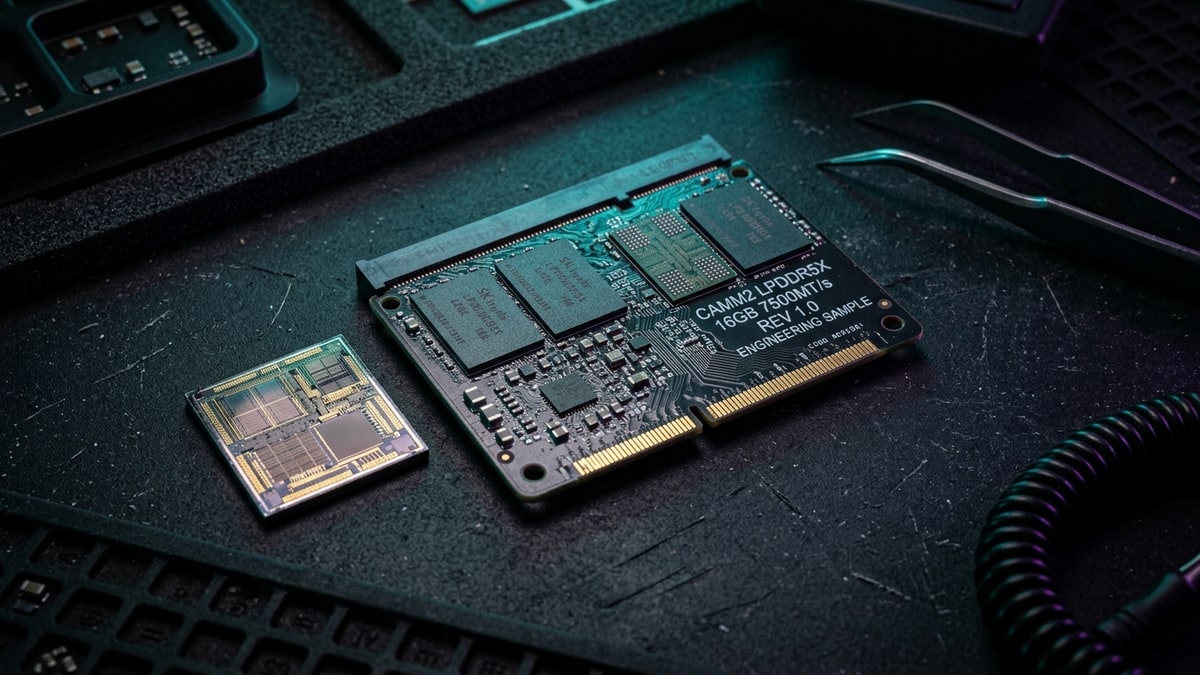
For 26 years SO-DIMM has been the memory shape of laptops, and its physical limits are starting to bite. CAMM2, the Compression Attached Memory Module standard JEDEC published in late 2023, lays RAM flat against the board to buy back the space and the speed SO-DIMM can no longer deliver.
What it covers: CAMM2 compared with SO-DIMM on profile, routing, density, and single-module dual-channel operation, plus the trade-offs it brings. Why it matters: CAMM2 can run faster and stay upgradeable in thin laptops, though it trades add-a-stick upgrades for whole-module swaps. Who should pick this: Laptop shoppers checking for LPCAMM2, plus small-form-factor builders weighing clearance and capacity up front.
What CAMM2 is
CAMM2 was Dell’s idea before it was anyone’s. Dell pushed the original CAMM concept at CES 2022 and shipped it in the Precision 7670 and 7770 workstations, then handed the design to JEDEC, which refined it and published it as JESD318 in December 2023. The standard has since been revised; JESD318B reached version 1.14 in November 2025. It defines both the electrical and mechanical requirements for the format in a single document.
The defining trait is how the module mounts. A CAMM2 does not slot vertically like a stick. It lies flat and presses against an interposer that carries pins on both sides to talk to the motherboard, held in place with a screw near the CPU — not unlike how an M.2 drive installs. Dell’s own figure is that CAMM2 is 57 percent thinner than SO-DIMM, which is the whole argument for putting it in thin laptops where vendors have otherwise resorted to soldering memory down.
There are two variants sharing one connector shape but different pinouts, and the mounting is deliberately designed so you cannot seat the wrong one. DDR5DDR5. A generation of system RAM (memory); newer and faster than DDR4. CAMM2 targets performance notebooks and mainstream desktops. LPDDR5/5X CAMM2, often shortened to LPCAMM2, is the low-power form for thin laptops and certain server segments. The LP variant is the one that matters most for repairability, because until now LPDDR5X has only been available soldered.
The speed and density argument
SO-DIMM tops out around 6,400 MT/s, and four-DIMM designs often run lower. CAMM2 clears that bar.
- Crucial is selling 32 GB and 64 GB LPDDR5X-7500 LPCAMM2 modules.
- Samsung lists an 8,533 Mbps transfer rate for its LPCAMM2, the same figure Geil showed at Computex, and Samsung has prototyped LPCAMM2 reaching 9,600 MT/s at 96 GB
- TeamGroup’s T-Create Expert AI LPCAMM2 reaches 8,533 MT/s at up to 64 GB.
| Vendor | Module |
|---|---|
| Crucial | 32 GB and 64 GB LPDDR5X-7500 LPCAMM2 modules |
| Samsung | 8,533 Mbps transfer rate for its LPCAMM2 |
| TeamGroup’s T-Create Expert AI LPCAMM2 | 8,533 MT/s at up to 64 GB |
Against soldered laptop memory that has reached about 7,467 MT/s on Intel’s Core Ultra platforms, replaceable CAMM2 is already faster and has headroom to climb.
Density is the other half. A single CAMM2 module holds between 8 GB and 128 GB, which is why a thin chassis can carry a lot of memory without modules on both sides of the board. JEDEC notes the connector can also be split lengthwise into two single-channel halves that elevate the module to different heights — 2.85 mm for one channel and 7.5 mm for another — which gives designers a path from single- to dual- to future multi-channel configurations on the same footprint.
Crucially, one CAMM2 can do dual-channel. With SO-DIMM you need two sticks for dual-channel memory; a single CAMM2 module carries both channels, which is why early desktop boards show only one CAMM2 slot. That is also the upgrade trade-off: adding memory means replacing the whole module rather than slotting in a second stick.
The latency benefit
The headline speeds get the attention, but the quieter argument for CAMM2 is routing. Because the module sits flat and close to the CPU, the traces that connect memory to the controller are shorter and more direct than the long, tall legs a SO-DIMM socket forces onto a board. Shorter traces mean less electrical distance, cleaner signal integrity, and the ability to drive higher data rates and tighter timings than SO-DIMM’s physical geometry allows — which is exactly why SO-DIMM’s speed ceiling is lower in the first place.
The latency benefit is not a single dramatic number; it is the structural reason CAMM2 can run faster and why a 9,600 MT/s module on a flat CAMM2 is feasible where it is not on a vertical SO-DIMM.
This is the same logic that pushed vendors to solder LPDDR5X onto the package or the board — get the memory as close to the controller as physically possible. CAMM2 recovers most of that proximity advantage while keeping the memory removable, which is the compromise that makes thin laptops repairable again rather than disposable.
Where it lands today
Adoption is real but still early. The Lenovo ThinkPad P1 Gen 7 was the first retail laptop to ship with LPCAMM2, using Micron modules. Crucial is selling LPCAMM2 directly. At Computex, TeamGroup introduced LPCAMM2 parts, MSI and Kingston showed an Intel Z790 board with Fury DDR5 CAMM2, and ASRock demonstrated a CAMM2 board for Arrow Lake. All three major DRAM suppliers — Micron, Samsung, and SK hynix — are on board, which is what gives the format a path to volume.
For laptops the benefit is straightforward: thinner machines with replaceable, faster memory instead of soldered chips. For small-form-factor desktops, the flat profile clears the air-cooler clearance problem that tall DIMM sticks create, and a single dual-channel module sidesteps the finicky four-stick tuning that motherboard manuals warn against. The desktop case is mostly aesthetic and clearance-driven today, since nothing has been soldering RAM to enthusiast boards, and the single-slot design limits you to replacing rather than adding memory.
The trade-offs
CAMM2 is not a free upgrade path. The install is a screw-down against a compression plate, which is simple but less foolproof than pressing in a stick, and going from 8 GB to 16 GB means buying a whole new module and selling the old one rather than adding a second. On the desktop side, early boards carry a single CAMM2 slot, so capacity ceilings and kit-swapping are real considerations for anyone who has historically grown memory over a system’s life.
It is also not the fastest possible memory. Memory soldered directly onto the processor package — Apple’s M-series and Intel’s Lunar Lake approach — sits closer still and runs tighter than even CAMM2 can manage. CAMM2 is the middle ground: faster and more repairable than SO-DIMM, more repairable than package-on-board, but not the absolute lowest-latency option available. For a device where repairability and upgradeability matter, that middle ground is the point.
What it means for buyers
Thin-and-light machines
For anyone shopping a thin-and-light, the appearance of LPCAMM2 in a spec sheet is worth checking for: it means the RAM is replaceable and upgradeable rather than fixed at purchase, and it can run at speeds SO-DIMM cannot reach. That changes the long-term value of the machine, since a memory upgrade later extends useful life without buying a new laptop.
Small-form-factor desktop builders
For small-form-factor desktop builders, CAMM2 boards are still a niche choice, and the single-slot constraint means you should buy the capacity you want up front rather than planning to add later. The clearance and aesthetic benefits are real but not yet worth seeking out at a premium for most builders.
The longer view
The longer view is that CAMM2 is the realistic successor to SO-DIMM for the segments where SO-DIMM’s physical limits bite hardest — thin laptops first, small desktops and servers alongside. It will take years to displace a 26-year-old standard, but with the standards body, the three memory majors, and major OEMs aligned, the path is set. The question for a buyer today is simply whether the device in front of them uses it, and whether the upgradeability it buys back matters to them.
Reading CAMM2’s position
A useful way to read CAMM2’s position is as the answer to a specific failure mode. Soldered memory gave thin laptops speed and proximity to the CPU at the cost of disposability; SO-DIMM gave upgradeability at the cost of a speed ceiling and a tall socket.
CAMM2 is the first credible option that keeps the speed and the low profile while handing repairability back to the owner. It is not the fastest possible memory and it is not the cheapest, but it resolves a trade-off the industry has been forcing on buyers for years — and that resolution is why the standard is worth tracking even if your next machine does not use it yet.
Next read
- For how memory pricing is reshaping graphics-card specs, see The 2026 VRAM Crunch.
- For the cache design defining AMD’s gaming CPUs, see Cache Under the Cores.
- For the Radeon architecture behind current AMD cards, see AMD Unveils RDNA 4 Architecture at CES 2025.